
In Forex trading, success isn’t only about finding the best entry signal — it’s about tracking your performance, managing your equity, and understanding your drawdown.
Most traders focus on strategies or indicators for entries and exits, but few realize how essential a reliable account statistic indicator is for long-term growth and risk control.
That’s exactly what the Account Statistic Indicator for MT4/MT5 delivers — a fully automated dashboard that summarizes all essential trading data in real time, directly on your chart. Whether you’re a manual trader or an EA developer, this tool gives you a clear overview of your account health at any moment.
🔹 Key Features of the Account Statistic Indicator
This indicator functions as a complete performance analysis system rather than just a simple info panel.
Below are its main features that make it an essential companion for every trader.
✅ 1.
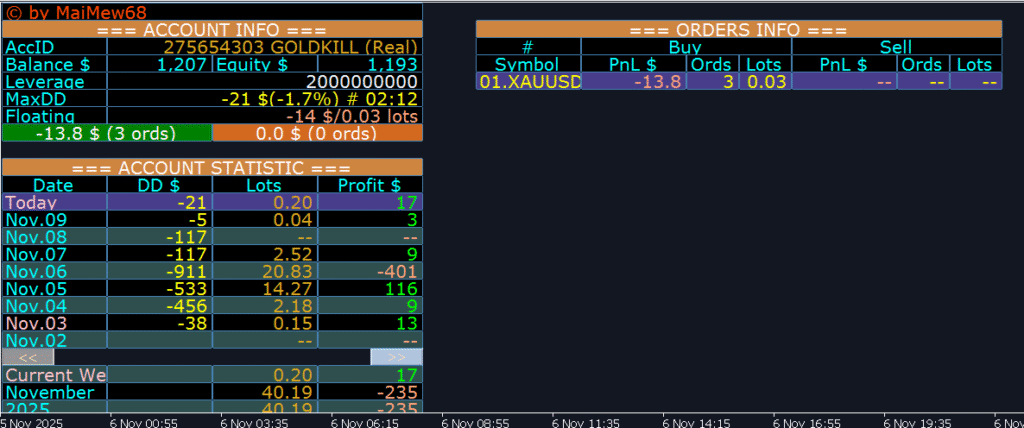
Real-Time Account Overview (Account Info)
Get all your account information in one place:
Account ID & Name – Displays your login ID and account name (e.g., GOLDKILL Real/Demo).
Balance & Equity – Track your total balance and current equity in real time.
Leverage – Shows your broker leverage ratio.
Max Drawdown (MaxDD) – Displays maximum drawdown value in both USD and percentage.
Floating Profit/Loss – Instantly shows your open trade profit/loss and total open lot size.
This section allows traders to quickly evaluate their account condition without navigating through multiple MT4 windows.
✅ 2.
Daily Trading Summary (Account Statistic)
The indicator provides a full day-by-day performance table, helping you monitor progress and consistency over time:
DD% (Drawdown) – Daily maximum loss percentage.
Lots – Total lot size traded during the day.
Profit $ – Net profit or loss in USD.
With this section, you can instantly see which days were profitable and which were risky, allowing better adjustments to your trading strategy.
✅ 3.
Open Orders Monitor (Orders Info)
A professional trader must always know the status of active positions.
This panel shows:
Symbol – The pair or asset you’re trading (e.g., XAUUSD, EURUSD).
PnL $ – Real-time profit or loss for each direction.
Orders & Lots – Number of trades and total lot size for both Buy and Sell sides.
This feature is extremely helpful when managing multiple trades simultaneously. You can easily monitor total exposure, open profits, and order count without opening the MT4 Terminal window.
✅ 4.
Professional Color Design and Layout
The Account Statistic Indicator uses clear, color-coded sections to help you read data effortlessly:
Green = profit
Red = loss
Yellow = key metrics like lot size, time, and drawdown
All data are neatly organized on a single chart, forming a modern Forex trading dashboard that enhances decision-making and reduces human error.
🔹 Why You Need the Account Statistic Indicator
Full performance tracking – Understand how much you earn or lose daily, weekly, or monthly without using external software.
Drawdown detection – Identify risk periods instantly and prevent large losses.
Evaluate trading strategies – Compare daily performance to refine your EA settings or manual trading methods.
Improve money management – Adjust lot sizes and stop levels based on actual historical data.
Suitable for everyone – Simple enough for beginners, yet powerful for advanced traders and EA testers.
🔹 How to Install and Use
Installation takes only a minute:
Copy the indicator file into your MQL4/Indicators (or MQL5/Indicators) folder.
Restart MT4/MT5.
Open any chart → Insert → Indicators → Account Statistic.
Customize position, font, and colors according to your preference.
Once installed, the panel automatically updates in real time, showing complete account analytics as you trade.
🔹 Advantages for EA Developers and Manual Traders
EA developers can use this indicator to track how their expert advisors perform over time — including daily lot usage, equity curve, and drawdown behavior.
Manual traders benefit from an easy visual summary of their trading habits, helping them recognize overtrading or poor risk control early.
Combined with a clear overview of floating profits, daily summaries, and historical performance, this tool acts like a personal trading assistant right on your screen.
🔹 Conclusion
The Account Statistic Indicator for MT4/MT5 is more than just an info panel — it’s a complete trading performance analytics dashboard designed to help traders stay organized, disciplined, and informed.
With clear visuals, automatic updates, and detailed statistics, you can monitor every aspect of your trading account effortlessly.
Whether you’re optimizing an EA or managing live trades, this indicator provides the clarity and insight you need to take your trading to the next level.
If you’re serious about trading performance and want a tool that keeps you in control, the Account Statistic Indicator is the must-have addition to your MT4 or MT5 toolbox.
link dowloads MT5:https://t.me/boteafxdotcom/22/23
link dowloads MT4:https://t.me/boteafxdotcom/22/24https://eagalaxy.net/indicator/
- Fxblue copy MT4 & MT5 – Copy Trade FREE
- Gold Snap MT5 Review: The Ultimate No-Martingale Gold Breakout EA For Quick Profits
- Black Scorpion EA MT4 – High-Precision Breakout Robot for Forex FREE
- Zig Zag Channels Indicator FREE – A Powerful Tool for Trend, Swing & Channel Trading
- Gold Killer EA v15 MT5 (No DLL) – Automated Gold Trading EA